Smart Home Energy Savings Guide 2026: Where Automation Really Pays Off
Smart heating control, energy monitoring, smart plugs and presence sensors: what really cuts your kWh, which devices to pick (tado X, Netatmo, Shelly, Tapo, Aqara) and the mistakes to avoid.

Quick answer
What is the best smart home gear for saving energy in 2026?
- View on Amazon →
Best overall
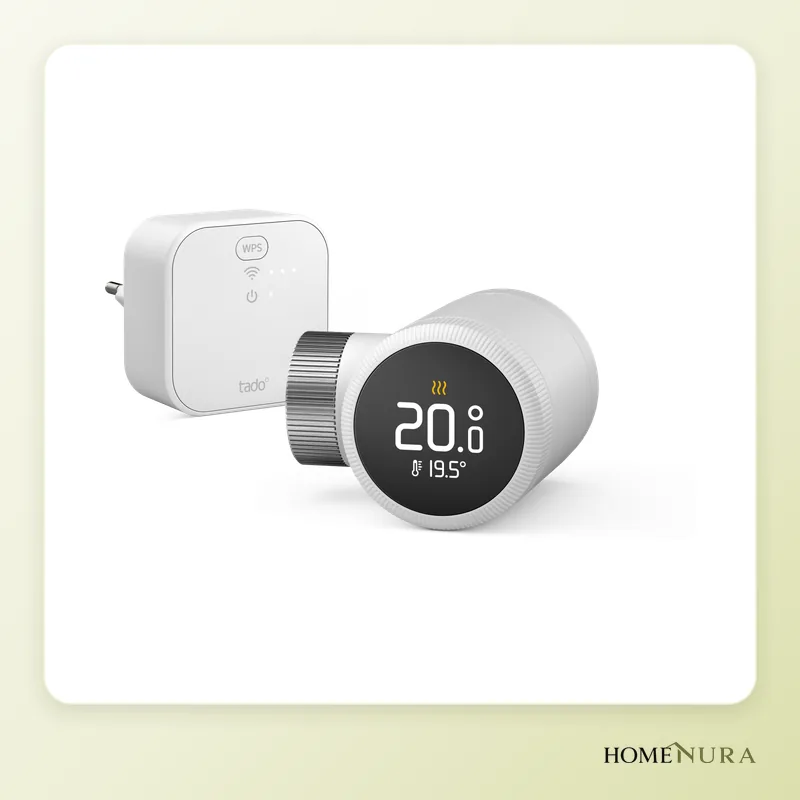
tado Smart Radiator Thermostat X Starter Kit
It goes after heating, the biggest energy user in the home: room-by-room control, Thread and Matter through the Bridge X, and tool-free installation.
Photo: © tado
- View on Amazon →
Best value
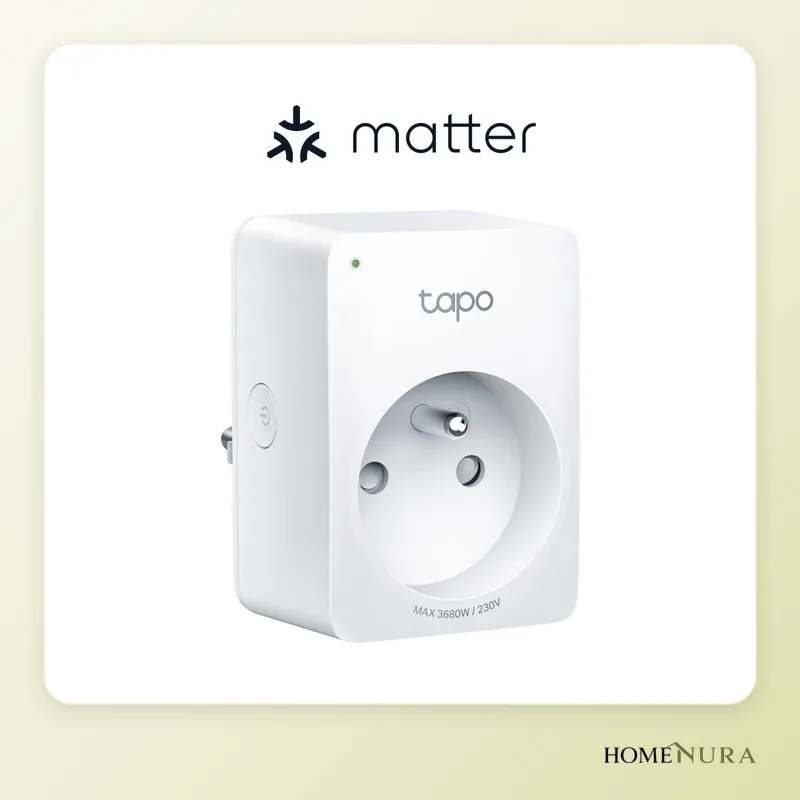
TP-Link Tapo P110M
A Matter-certified Wi-Fi smart plug that measures each appliance's use in kWh: the simplest way to spot wasted energy.
Photo: © TP-Link
- View on Amazon →
Best for whole-home monitoring
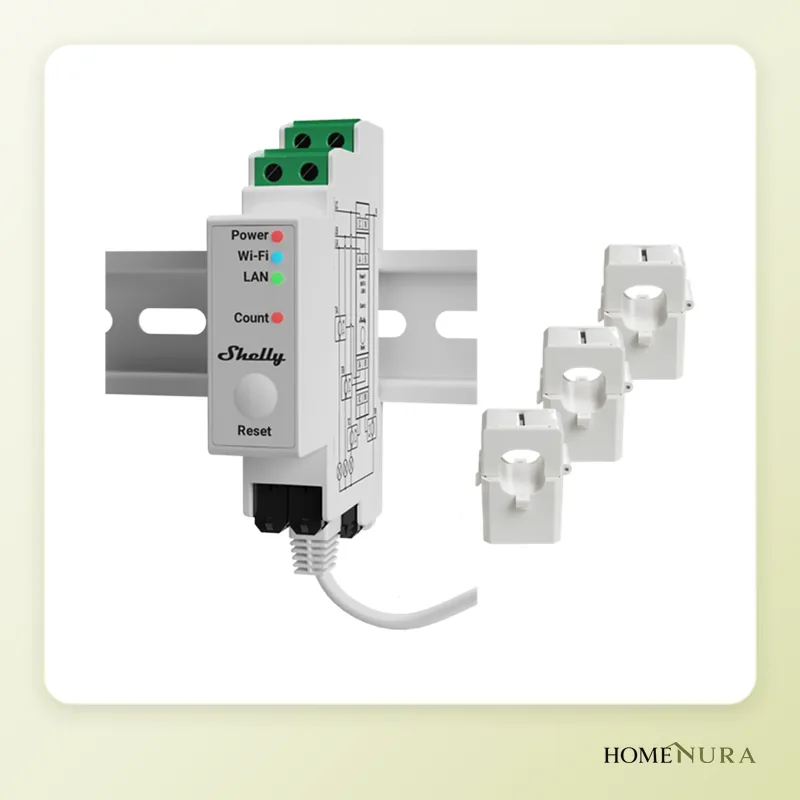
Shelly Pro 3EM
A single- or three-phase DIN-rail meter with bidirectional metering, useful with solar; it must be installed by a licensed electrician.
Photo: © Shelly (Allterco Robotics)


As an Amazon Associate I earn from qualifying purchases. Amazon affiliate links: we earn a commission at no extra cost to you.
A smart home really does cut energy use when it goes after heating first: a smart thermostat or room-by-room smart radiator valves such as the tado X target the biggest item on the bill. Next comes measurement (smart plugs and energy monitors) to track down waste, then a few simple automations. Gadgets that control neither heating nor power-hungry appliances save almost nothing.
This guide isn’t based on in-house testing: it compares devices using manufacturer specs, independent reviews and verified owner reviews. Savings always depend on your home, its insulation, your heating system and your habits, so the figures below are ballpark estimates, never promises.
Where a home’s energy goes
According to Eurostat, space heating accounts for roughly two-thirds of the final energy used by households in the European Union. Water heating comes a distant second, followed by lighting and appliances. That split sets the priorities: a device that controls heating better will almost always do more than a smart bulb.
France’s energy agency ADEME estimates that turning your thermostat down by 1°C (about 2°F) cuts heating use by about 7%. That’s exactly what a good smart thermostat does: it lowers the temperature when nobody’s home, at night and in empty rooms, without you having to think about it. Devices on standby draw little power individually, but they draw it around the clock, which is why it pays to measure them before you turn them off.
Models mentioned in this guide
- Netatmo Smart ThermostatView on Amazon →
- Shelly Plug S Gen3View on Amazon →
Photos: © tado, © TP-Link, © Shelly (Allterco Robotics)
As an Amazon Associate I earn from qualifying purchases. Amazon affiliate links: we earn a commission at no extra cost to you.
How to choose
Compatibility with your heating system
Check this first. A wired thermostat connects to a boiler or heat pump (an on/off dry contact or a modulating protocol, depending on the model); smart radiator valves screw onto the valves of hot-water radiators; electric heaters are usually controlled through a pilot wire (a common setup in France) or are smart models in their own right. Use the manufacturer’s compatibility checker before you buy.
Protocol: Matter, Thread, Wi-Fi or Zigbee
Matter lets devices from different brands work together in Apple Home, Google Home, Amazon Alexa or SmartThings. Thread is a low-power mesh network suited to battery-powered devices. Wi-Fi needs no bridge, but it puts more load on your home network as devices multiply. Our Matter and Thread guide explains these choices in detail.
Energy monitoring
A plug that measures real-time power and adds up the kWh tells you what an appliance really costs to run. A monitor installed in your electrical panel gives you the whole-home picture, including any solar production.
Local control and subscriptions
Check whether automations run without the manufacturer’s cloud and whether some features require a subscription. It matters for reliability as much as for long-term cost.
The devices to prioritize in 2026
tado Smart Radiator Thermostat X Starter Kit: best overall
The tado X starter kit pairs a smart radiator thermostat with the Bridge X, which acts as a Thread border router. The thermostat is Matter compatible, fits most radiator valves with the included adapters and runs on a rechargeable battery. You can control everything from the tado app or from Apple Home, Google Home and Alexa.
Pros: room-by-room control, tool-free installation on hot-water radiators, a complete ecosystem (wired thermostat, sensors, extra valves). Cons: the X range doesn’t work with older tado V3+ products, and some advanced automations, such as automatic geofencing, are part of the optional Auto-Assist subscription. Best for: homes with hot-water radiators that want to stop heating empty rooms.
Netatmo Smart Thermostat: the safe choice for a boiler
The Netatmo thermostat replaces a standard wall thermostat and switches the boiler through a relay. Its Auto-Adapt feature works out when to start heating based on your home’s insulation and the outdoor temperature, and the app sends a monthly energy report. It works with Apple HomeKit, Alexa and Google Assistant.
Pros: simple settings, regular reports, understated design. Cons: a single heating zone unless you add smart valves, and on/off control that doesn’t suit every heat pump. Best for: houses and apartments with their own boiler and one central thermostat.
TP-Link Tapo P110M: the most affordable energy-monitoring plug
The Tapo P110M is a Matter-certified Wi-Fi smart plug that measures the energy use of whatever is plugged into it. The app shows your kWh history and lets you enter your electricity rate to estimate the cost. It works with Apple Home, Alexa, Google Home and SmartThings, and its compact shape leaves the other outlet free.
Pros: native Matter, quick setup, ideal for auditing power-hungry appliances. Cons: 2.4 GHz Wi-Fi only, fewer advanced features than Shelly. Best for: anyone who wants to measure several appliances on a modest budget.
Shelly Plug S Gen3: the plug for power users
The Shelly Plug S Gen3 monitors power, handles loads up to 2,500 W, is Matter certified and needs no hub. It stands out for its local API and its popular Home Assistant integration, which lets you trigger automations at a power threshold (for example, a notification when the washer is done).
Pros: local control, lots of automation options, a built-in Wi-Fi range extender. Cons: more technical settings, and the 2,500 W limit rules out the most powerful space heaters. Check the plug type sold for your country, too. Best for: Home Assistant users and anyone who wants fine-grained automations.
Shelly Pro 3EM: the whole-home view
The Shelly Pro 3EM is a DIN-rail energy meter with CT clamps that works on single-phase and three-phase power. It measures in both directions, consumption and production, which makes it useful with solar panels. It comes in 120 A and 400 A versions with a stated accuracy of 1%, and it connects over Wi-Fi or Ethernet, locally or through the cloud.
Pros: a complete view of your home, solar self-consumption tracking, history stored on the device. Cons: it goes inside your electrical panel, a job for a licensed electrician. Best for: homes with solar panels, a heat pump or an EV charger. Our home energy monitor comparison also covers options that don’t require any wiring work.
Aqara Presence Sensor FP2: heat and light only the rooms you’re using
The FP2 uses millimeter-wave radar that detects people even when they’re sitting still, unlike standard infrared motion sensors. It covers up to 430 sq ft (40 m²), can split a room into 30 zones, tracks several people and runs on 2.4 GHz Wi-Fi without an Aqara hub, with Apple Home, Alexa, Google Home and Home Assistant.
Pros: reliable detection of someone who’s reading or working, customizable zones. Cons: powered by a USB cable, and setting up the zones takes some care. Best for: anyone who wants the lights and heat off in rooms that are truly empty.
Comparison table
| Device | Role | Connectivity | Best for |
|---|---|---|---|
| tado Smart Radiator Thermostat X Starter Kit | Room-by-room control | Thread, Matter (Bridge X) | Hot-water radiators |
| Netatmo Smart Thermostat | Boiler thermostat | Wi-Fi, HomeKit | Homes with their own boiler |
| TP-Link Tapo P110M | Per-appliance monitoring | Wi-Fi, Matter | Auditing energy use |
| Shelly Plug S Gen3 | Monitoring and automation | Wi-Fi, Matter, Bluetooth | Home Assistant |
| Shelly Pro 3EM | Whole-home energy monitor | Wi-Fi, Ethernet | Solar, heat pump |
| Aqara Presence Sensor FP2 | Presence detection | 2.4 GHz Wi-Fi | Rooms used on and off |
See our full selection of smart thermostats and home energy monitors in our catalog.
A worked example in kWh
A device that draws 10 W around the clock, such as a cable box or a speaker left on standby, uses 10 W × 8,760 hours, or about 88 kWh a year. At an example rate of 20 cents per kWh (check the rate on your utility bill), that’s about $18 a year for a single device. A smart plug that cuts power to these devices overnight and while you’re out eliminates a good share of that.
The same logic applies to heating: if your home uses 10,000 kWh a year for heating, lowering the average temperature by 1°C (about 2°F) works out, by ADEME’s rule of thumb, to about 700 kWh less. Controls that turn the setpoint down in empty rooms and at night pull exactly this lever.
Automations that really save energy
- Night and away schedules: turn the heat down at night and during the day when no one’s home.
- Open-window detection: shut off the radiator while a window is open to air out the room.
- One-tap shutoff: a “Leaving home” routine that turns off the lights and the plugs feeding standby devices.
- Room-by-room presence: turn off the lights and any space heater when the sensor no longer detects anyone.
- Solar: start a programmable appliance when production exceeds consumption, if you have balcony solar panels or a rooftop system.
Mistakes to avoid
- Starting with lighting: LEDs already use little power; the real gains are in heating.
- Buying without checking compatibility: your boiler, heat pump, radiator valves and plug type all have to match.
- Plugging a space heater into a small smart plug: stay within the maximum load stated by the manufacturer.
- Piling up apps: favor Matter or a central hub so you can manage everything in one place.
- Believing in guaranteed savings: advertised percentages depend on the home; measure before and after.
Installation and safety
Smart plugs and radiator valves install without tools. A wired thermostat connected to the boiler or a monitor installed in your electrical panel, however, means working on your home’s wiring: turn off the power at the breaker and, if you have any doubt, hire a licensed electrician and check whether your area requires a permit. Never plug in an appliance that draws more than the smart plug is rated for, and avoid daisy-chaining power strips.
The bottom line
For most homes heated by hot-water radiators, the tado Smart Radiator Thermostat X Starter Kit is the most effective place to start because it targets the biggest energy user. With a boiler and a single central thermostat, the Netatmo Smart Thermostat remains a simple, reliable choice. For monitoring on a budget, the Tapo P110M is the most affordable, the Shelly Plug S Gen3 the most flexible, and the Shelly Pro 3EM gives you the complete picture, especially with solar. To dig deeper into heating, read our smart thermostat and heat pump guide.
Frequently asked questions
Which smart home device saves the most energy?
Does a smart plug use electricity itself?
Do I need an electrician to install these devices?
Is Matter essential for saving energy?
How can I tell how much I'm actually saving?
From our complete guide
Energy & Smart Home →Our recommendations
- Netatmo Smart ThermostatView on Amazon →
- Shelly Plug S Gen3View on Amazon →
Photos: © tado, © TP-Link, © Shelly (Allterco Robotics)
As an Amazon Associate I earn from qualifying purchases. Amazon affiliate links: we earn a commission at no extra cost to you.


