Best Home Energy Monitors of 2026: 6 Top Models Compared
Shelly Pro 3EM, Shelly EM Gen3, Lixee ZLinky_TIC, Ecojoko, Tibber Pulse P1 and frient EMI 2 LED compared: CT clamps or France’s Linky TIC port, the P1 port, solar tracking, Home Assistant and when you need an electrician.

Quick answer
What is the best home energy monitor in 2026?
- View on Amazon →
Best overall
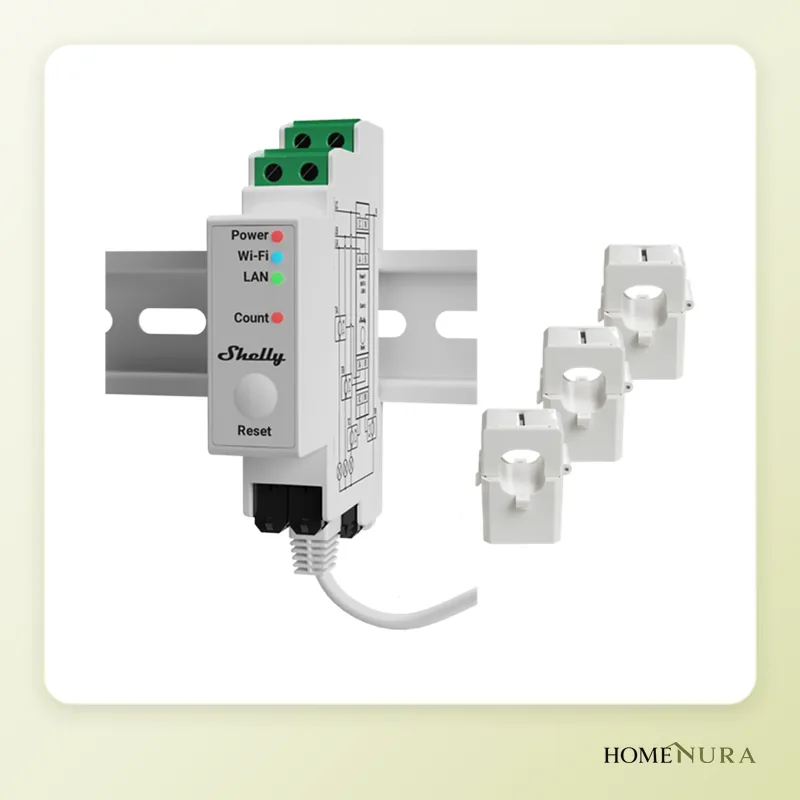
Shelly Pro 3EM
Three CT clamps, three-phase support, bidirectional metering for solar and local Home Assistant integration.
Photo: © Shelly (Allterco Robotics)
- View on Amazon →
Best value
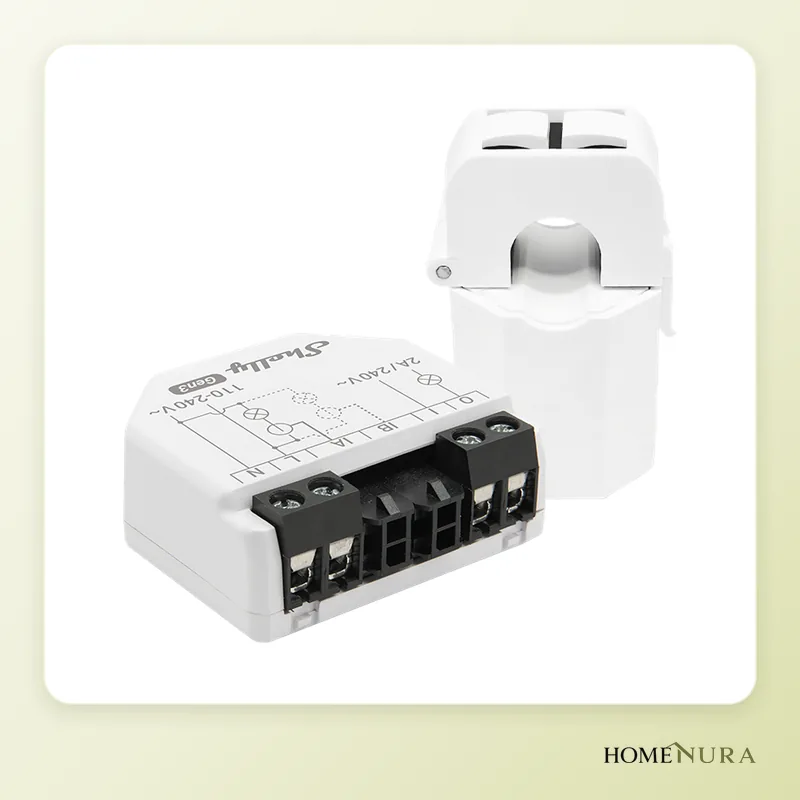
Shelly EM Gen3
Compact two-channel single-phase monitor that tracks whole-home use plus one extra circuit, over Wi-Fi.
Photo: © Shelly (Allterco Robotics)
- View on Amazon →
Best for French Linky meters
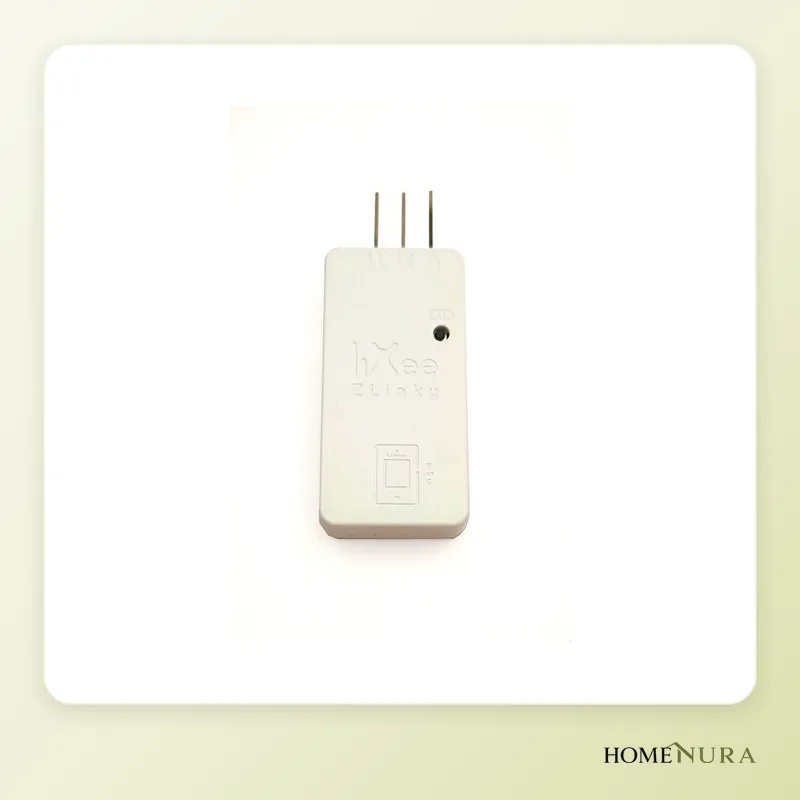
Lixee ZLinky_TIC
Connects to the TIC terminals on France's Linky meter, draws its power from the meter, runs on Zigbee 3.0 and needs no electrician.
Photo: © LiXee


As an Amazon Associate I earn from qualifying purchases. Amazon affiliate links: we earn a commission at no extra cost to you.
The best home energy monitor of 2026 for most homes is the Shelly Pro 3EM: three CT clamps, two-way metering (power drawn from the grid and solar exported to it) and local integration with Home Assistant. If your home has a French Linky smart meter, the Lixee ZLinky_TIC reads the meter directly with no work inside the electrical panel, while the Shelly EM Gen3 is the most affordable option for single-phase homes.
This comparison is based on manufacturer spec sheets, documentation from smart home projects and verified owner reviews. It covers only whole-home energy monitors. To measure a single appliance (washer, freezer, router), see our comparison of smart plugs with energy monitoring instead.
CT clamps or the meter’s data port: two ways to measure
A home energy monitor gets your total usage in one of two very different ways, and that choice shapes everything else.
CT clamps in the electrical panel
A CT clamp (current transformer) opens and clips shut around a hot wire without cutting it. The monitor it plugs into, powered from the 230 V supply on European installations, measures current and voltage to calculate power. The upside: it works with any meter, it can track several circuits (water heater, heat pump, EV charger) and it knows which way the current is flowing, which is essential with solar panels. The downside: it goes inside the electrical panel, where dangerous voltages are present.
The customer port on the smart meter
European smart meters have a data output meant for the customer. In France, the Linky meter offers the TIC (customer tele-information) terminals under its lower cover. In the Netherlands, Luxembourg and Belgium, it’s the P1 port (an RJ12 jack), which in Belgium usually has to be activated by the grid operator first. In Germany, recent electronic meters have an optical infrared interface, and the detailed data often requires a PIN from the meter operator. The big advantage: no electrical work at all, and the readings come from the same registers used for your bill.
Note that the Linky runs in “historical” TIC mode by default. The “standard” mode, which sends more information, including energy exported to the grid, can be requested from your French electricity supplier.
Models mentioned in this guide
- EcojokoView on Amazon →
- Tibber Pulse P1View on Amazon →
Photos: © Shelly (Allterco Robotics), © LiXee
As an Amazon Associate I earn from qualifying purchases. Amazon affiliate links: we earn a commission at no extra cost to you.
How to choose
- Your meter: a Linky or a meter with a P1 port opens the door to solutions that need no electrician. An old electromechanical meter means clamps.
- Single-phase or three-phase: on a three-phase supply, you need to measure all three phases, or a single-clamp monitor will badly underestimate usage. Most North American homes have split-phase 120/240 V service instead, so check that a monitor designed for Europe supports your setup.
- Solar production: make sure the device separates the energy you import from the energy you export (two-way metering or the meter’s export register).
- Ecosystem: standalone Wi-Fi, Zigbee (needs a hub), a proprietary app or Home Assistant. A local integration keeps working without the manufacturer’s cloud.
- Update rate: a few seconds is enough to spot a power spike or drive solar-surplus charging.
- Meter location: a Linky at the property line or in a utility closet may be out of Wi-Fi or Zigbee range.
The 6 best home energy monitors of 2026
1. Shelly Pro 3EM: the benchmark for three-phase and solar
The Shelly Pro 3EM is a DIN-rail energy meter that mounts inside the electrical panel. It ships with three 120 A clamps (a 400 A variant exists for larger installations) and measures each of the three phases separately, in both directions. Shelly quotes 1% accuracy on active energy and 60 days of on-device history at one-minute resolution.
Pros: Wi-Fi, Ethernet and Bluetooth; two-way metering that suits solar self-consumption; Modbus for more technical setups; native local integration with Home Assistant, plus Google Home and Amazon Alexa support.
Cons: it has to be installed by a licensed electrician, and it’s more than you need just to watch the usage of a small apartment.
Best for: three-phase homes, households with solar panels, a heat pump or an EV charger, and Home Assistant users.
2. Shelly EM Gen3: best value for single-phase homes
The Shelly EM Gen3 is a compact two-channel monitor for single-phase installations. It comes with one 50 A clamp, and you can add a second clamp to track another circuit, such as a solar inverter’s output or a heat pump. It connects over Wi-Fi with no hub, is set up over Bluetooth and has a dry contact for driving a contactor.
Pros: small enough for most panels, two circuits measured at once, 1% quoted accuracy, and the same ecosystem as the Pro 3EM, with local Home Assistant integration.
Cons: single-phase only, installation inside the panel should be left to a pro, and there’s only one clamp in the box.
Best for: single-phase houses and apartments that want overall usage plus one key circuit.
3. Lixee ZLinky_TIC: the Linky in Home Assistant, no electrician
The Lixee ZLinky_TIC is a small French module that plugs into the Linky meter’s TIC terminals and sends its data over Zigbee 3.0. It draws its power from the meter itself: no battery, no outlet. It handles historical and standard modes, France’s Base, off-peak and Tempo rate plans, single-phase and three-phase supplies, and it reports exported energy when the Linky is in standard mode.
Pros: installed in minutes without touching the electrical panel, readings that match your bill, support in Home Assistant through ZHA and Zigbee2MQTT, as well as in Homey. A version with an external antenna exists for meters that sit far from the house.
Cons: it needs a Zigbee hub, it has no consumer-friendly app of its own, and setup (TIC mode, sensor units) can be tricky for beginners.
Best for: French homes with a Linky meter that already run a Zigbee smart home hub.
4. Ecojoko: the ready-made assistant for cutting your bill
Ecojoko is a French system that pairs a sensor with a small display unit for the living room. The Linky version plugs into the meter’s TIC port in a few minutes. The display shows live power use, and the app estimates the split between major uses (heating, refrigeration, standby, lighting) from the electrical signatures of your appliances.
Pros: the simplest option here, designed for the whole family rather than smart home enthusiasts, with energy-saving tips in the app. A rental plan is offered alongside outright purchase.
Cons: it relies on the manufacturer’s cloud, has no official Home Assistant integration (a community integration exists) and is focused on the French market.
Best for: households that want to understand and reduce their usage without setting up a smart home hub.
5. Tibber Pulse P1: the answer for P1-port meters
The Tibber Pulse P1 plugs into the P1 port of Dutch smart meters with the included RJ12 cable and sends data over Wi-Fi to the Tibber app. It shows live usage and can manage EV charging (load balancing, solar-surplus charging) with compatible chargers. For Germany, Tibber offers an infrared-reading variant, the Pulse IR.
Pros: tool-free installation, usable without a Tibber electricity contract, official Tibber integration in Home Assistant.
Cons: some features, such as detailed history, are reserved for Tibber customers; some older meters need extra power over micro-USB; the integration goes through the cloud. The P1 model doesn’t work with Linky meters.
Best for: Dutch households and, more broadly, owners of P1-port meters who manage an EV charger.
6. frient Electricity Meter Interface 2 LED: universal optical reading
The frient Electricity Meter Interface 2 LED sticks over the pulse LED on electronic meters (1,000 pulses per kWh) and counts the flashes. It runs on three AA batteries, with a quoted life of about two years, and communicates over Zigbee. A P1 variant exists for Dutch and Belgian meters.
Pros: works with many European electronic meters, tool-free installation with no electrician, and support for Zigbee hubs, including Home Assistant.
Cons: it needs a Zigbee hub and runs on batteries, and reading the LED gives you total usage without properly separating exported energy, so it’s a poor fit for homes with solar panels.
Best for: homes with neither a Linky nor an accessible P1 port that want whole-home numbers without any work in the electrical panel.
What about the others?
Legrand’s Drivia with Netatmo smart energy meter also installs in the electrical panel, but it tracks a single single-phase circuit and requires Legrand’s Home + Control ecosystem. Sense, known for appliance detection, is aimed mainly at the North American market. The Fluksometer, popular with enthusiasts, remains a niche product sold mostly by its designer.
Comparison table
| Model | Measurement method | Connectivity | Installation | Solar tracking | Best for |
|---|---|---|---|---|---|
| Shelly Pro 3EM | 3 clamps, three-phase | Wi-Fi, Ethernet, Bluetooth | Electrician (DIN rail) | Yes, two-way | Three-phase, solar, Home Assistant |
| Shelly EM Gen3 | Clamps, 2 single-phase channels | Wi-Fi, Bluetooth | Electrician | Yes, via 2nd channel | Single-phase, tight budgets |
| Lixee ZLinky_TIC | Linky TIC port | Zigbee 3.0 | DIY | Yes, in standard mode | Linky + smart home hub |
| Ecojoko | Linky TIC port | App and display | DIY | Not the focus | Simply cutting your bill |
| Tibber Pulse P1 | P1 port | Wi-Fi | DIY | Depends on meter | Netherlands, EV charging |
| frient EMI 2 LED | Optical LED | Zigbee | DIY | No | Meters without a customer port |
Mistakes to avoid
- Installing clamps in the panel yourself without the right skills: even though a clamp cuts no wire, you’re working next to live parts.
- Measuring one phase on a three-phase supply: the result shows only part of your real usage.
- Ignoring clamp direction: a clamp installed backward swaps import and export, a common mistake with solar.
- Buying a TIC module without checking radio range: a Linky in the garage or at the property line may be too far from the hub.
- Confusing a whole-home monitor with a smart plug: the monitor shows totals and spikes, the plug measures one appliance. They complement each other.
Installation and safety
Any work inside the electrical panel (mounting a DIN-rail module, wiring it to the supply, placing clamps) should be done by a licensed electrician. In France, that work must follow the NF C 15-100 wiring standard; elsewhere, check your local building code and whether a permit is needed. Always shut off the power before you open the panel. In France, the Linky meter belongs to the grid operator: only the customer TIC terminals under the lower cover are meant for you, and nothing else on the meter should be opened or tampered with. The same goes for a P1 port: you plug in a cable, nothing more.
With solar panels, measure at the grid connection point to see your real self-consumption, and add a second measurement on the inverter if needed. For a small plug-in kit, our balcony solar panel guide explains how it connects.
The bottom line
The Shelly Pro 3EM is the most complete energy monitor here: three-phase, two-way, local and open. For single-phase homes, the Shelly EM Gen3 delivers the essentials for a fraction of the budget. If you have a Linky and a smart home hub, the Lixee ZLinky_TIC is the cleanest no-electrician solution. Ecojoko suits people who want instant results without a smart home setup, the Tibber Pulse P1 fits Dutch meters and the frient EMI 2 LED covers meters without a customer port. See the full lineup in our energy monitors section.
Frequently asked questions
Do I need an electrician to install a home energy monitor?
CT clamps or the smart meter’s port: which should I choose?
Can a home energy monitor track solar production?
Do these monitors work with Home Assistant without the cloud?
How is this different from an energy-monitoring smart plug?
My meter is far from the house: how do I get its data?
From our complete guide
Energy & Smart Home →Our recommendations
- EcojokoView on Amazon →
- Tibber Pulse P1View on Amazon →
Photos: © Shelly (Allterco Robotics), © LiXee
As an Amazon Associate I earn from qualifying purchases. Amazon affiliate links: we earn a commission at no extra cost to you.


