Best Smart Motion Sensors of 2026: PIR vs. mmWave Compared
Aqara P2, Aqara FP2, Philips Hue, IKEA MYGGSPRAY, Eve Motion and Ajax MotionProtect compared: PIR or mmWave radar, battery life, light sensor, pet immunity, Matter, value tiers, and lighting vs. security use.

Quick answer
What is the best smart motion sensor in 2026?
- View on Amazon →
Best overall
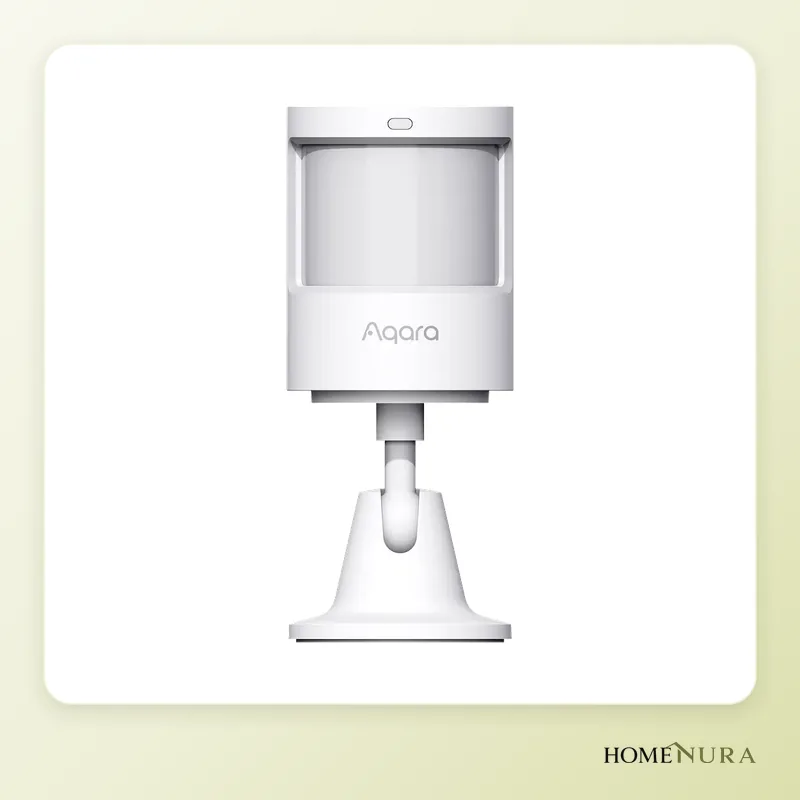
Aqara Motion and Light Sensor P2
A 170° PIR sensor on Matter over Thread, with a light sensor and up to two years of rated battery life.
Photo: © Aqara
- View on Amazon →
Best value
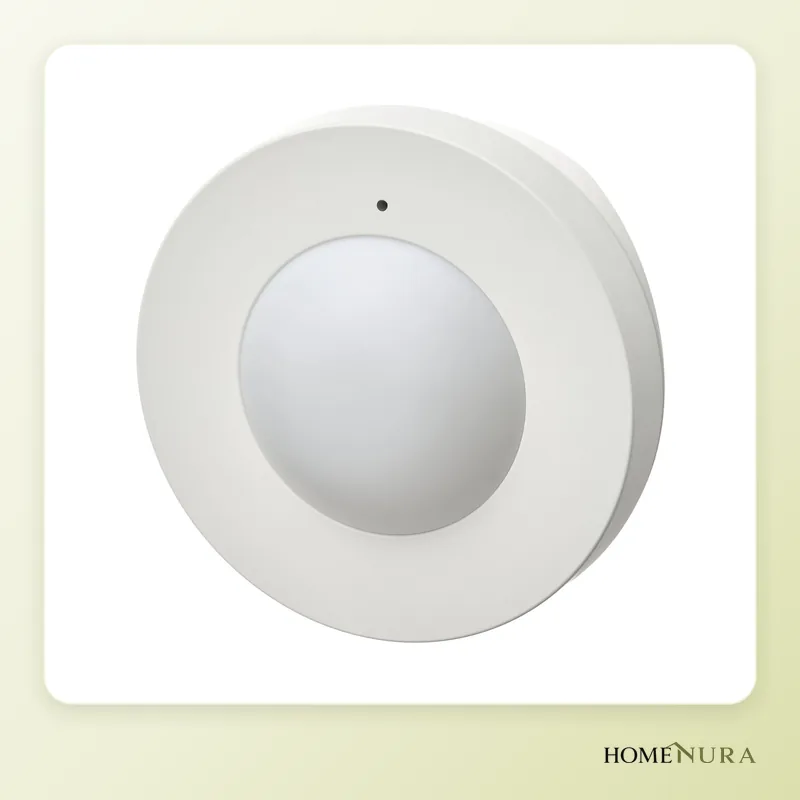
IKEA MYGGSPRAY
Entry-level, Matter over Thread, IP67 for indoor and outdoor use, rechargeable AAA batteries.
Photo: © Inter IKEA Systems B.V.
- View on Amazon →
Best presence sensor
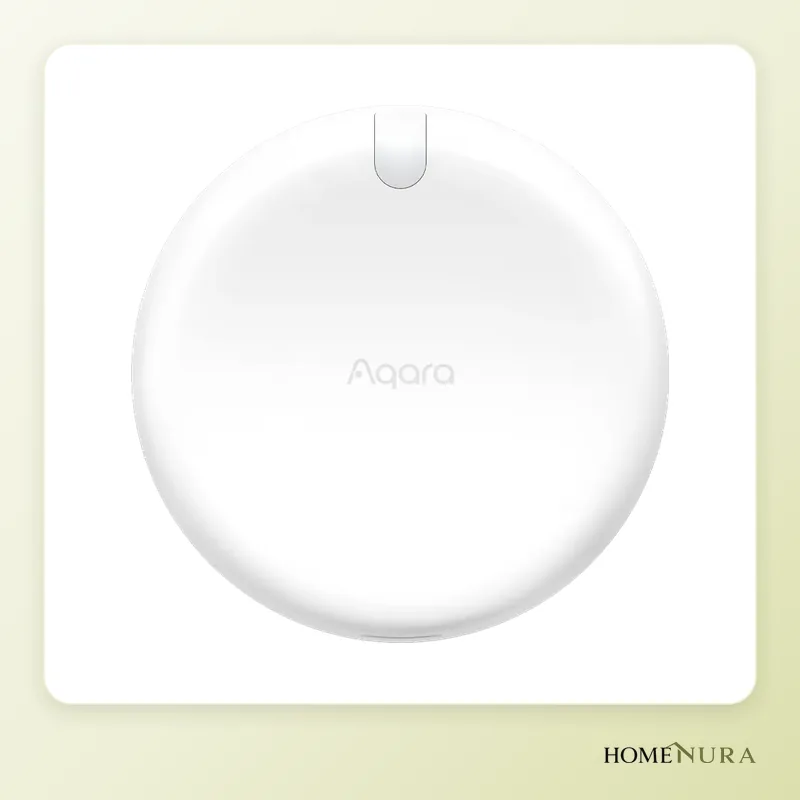
Aqara Presence Sensor FP2
mmWave radar that detects people sitting still, with up to 30 zones and five people, and no batteries to change.
Photo: © Aqara


As an Amazon Associate I earn from qualifying purchases. Amazon affiliate links: we earn a commission at no extra cost to you.
For most homes, the best smart motion sensor in 2026 is the Aqara Motion and Light Sensor P2: a battery-powered infrared (PIR) sensor that runs on Matter over Thread, has a built-in light sensor and is rated for up to two years on a set of batteries. If you need the system to know someone is still in the room even when they sit perfectly still, step up to an mmWave radar presence sensor such as the Aqara Presence Sensor FP2. And if what you really want is a security system, an alarm-grade detector like the Ajax MotionProtect is the safer choice.
This comparison is based on manufacturer specs, published independent reviews and verified owner feedback. It covers six models sold in Europe, explains the difference between motion detection and presence detection, and compares sensors by value tier rather than by price, since prices change constantly while the trade-offs at each level don't. You can also browse our full selection of motion sensors.
PIR motion sensor or mmWave presence sensor: the real difference
This is the question that drives every other decision, because the two technologies solve different problems.
- PIR (passive infrared) picks up changes in heat as a body crosses its field of view. It draws very little power, which is why PIR sensors can run on batteries for months or years. The catch: it only sees movement. Someone sitting still at a desk or reading on the couch eventually "disappears," and the lights go off.
- mmWave (millimeter-wave) radar detects tiny movements, down to breathing. That means it knows a room is occupied even when nobody moves. Some models track several people and split a room into zones. The trade-off is power: most mmWave sensors have to stay plugged in (USB-C).
In practice, a PIR sensor is all you need in hallways, entryways, stairways, a half bath or the garage, where people just pass through. An mmWave presence sensor earns its place in a home office, living room, bathroom or bedroom, where people stay put for long stretches.
Models mentioned in this guide
- Philips Hue Motion SensorView on Amazon →
- Eve MotionView on Amazon →
Photos: © Aqara, © Inter IKEA Systems B.V.
As an Amazon Associate I earn from qualifying purchases. Amazon affiliate links: we earn a commission at no extra cost to you.
How to choose: what to look for
1. Protocol and ecosystem
A sensor never works on its own: it triggers a light, a notification or a siren through an ecosystem. The main options are Matter over Thread (works across Apple Home, Google Home, Amazon Alexa and SmartThings, but needs a Thread border router), Zigbee (reliable, but tied to a bridge such as the Hue Bridge or IKEA's Dirigera hub), Wi-Fi (no hub, but rarely compatible with battery power) and Bluetooth. Security systems such as Ajax use their own proprietary radio. For a primer on these standards, read our Matter and Thread guide.
2. Battery life and power
Battery-powered PIR sensors are rated for one to five years, depending on the model, how often they trigger and the protocol. Longer battery life means fewer trips up a ladder. mmWave sensors need an outlet nearby, so plan the location around one.
3. Light (lux) sensor
This is essential for lighting automations: it keeps a lamp from switching on in broad daylight. Most recent models include one, with varying accuracy. To tell whether a room is light or dark, even a rough sensor is enough.
4. Pet immunity
It's often overlooked. A lighting sensor will react to a cat or dog, which rarely matters. For a security system, it's a deal-breaker: you need a detector designed to ignore animals up to a given weight and height. Few consumer sensors claim this; alarm-grade detectors do.
5. Range, angle and IP rating
Expect 16 to 40 ft (5 to 12 m) of range and 90 to 170 degrees of coverage, depending on the model. For outdoor use or a bathroom, check the IP rating: IPX3 handles rain in a covered spot, while IP67 copes with fully exposed locations outdoors.
The 6 best motion and presence sensors in 2026
1. Aqara Motion and Light Sensor P2 — best overall
The P2 pairs a wide-angle PIR sensor with a separate light sensor. Aqara quotes detection up to 23 ft (7 m) across 170 degrees horizontally, enough to cover a whole room from a corner. It runs on Matter over Thread, so it works with Apple Home, Google Home, Alexa or SmartThings without an Aqara hub, as long as you have a Thread border router (Apple TV, HomePod mini, a recent Nest Hub, some Echo devices…). It's powered by two CR2450 coin cells, with battery life rated at up to two years.
Pros: very wide detection angle, native Matter, good battery life, low-profile design.
Cons: PIR only (it won't detect someone sitting still), no claimed pet immunity, Thread border router required.
Best for: anyone automating the lights in a hallway, entryway or kitchen without getting locked into one ecosystem.
2. Aqara Presence Sensor FP2 — best presence sensor
The FP2 uses mmWave radar sensitive enough to pick up very small movements, including breathing. It covers up to 430 sq ft (40 m²), can divide a room into 30 zones, tracks up to five people at once and includes a light sensor. It connects over 2.4 GHz Wi-Fi, works with Apple Home, Alexa, Google Home and Home Assistant without a hub, and is powered over USB-C. Its IPX5 rating makes it suitable for a bathroom. Aqara also offers a fall-detection mode when the sensor is mounted on the ceiling.
Pros: true presence detection, multiple zones, multi-person tracking, no batteries to change.
Cons: has to stay plugged in, zone setup takes longer than with a basic sensor, premium tier.
Best for: home offices, living rooms, bathrooms, or any room where the lights must not switch off while you're reading.
3. Philips Hue Motion Sensor — easiest in the Hue world
Philips Hue's indoor motion sensor is still the default pick if you already own Hue bulbs. It runs on Zigbee through the Hue Bridge, detects up to 16 ft (5 m) across 120 degrees, includes a daylight sensor and also reports the temperature. It takes two AAA batteries, with battery life rated at around two years. The Hue app makes it easy to set different scenes by time of day (dimmed lights at night, for instance).
Pros: seamless with Hue lighting, very simple day/night settings, standard batteries.
Cons: Hue Bridge required, indoor only, shorter range than the P2.
Best for: homes already on Philips Hue that want a set-it-and-forget-it option.
4. IKEA MYGGSPRAY — best value
The MYGGSPRAY is part of IKEA's new Matter lineup. It's a PIR sensor running Matter over Thread, with a light sensor, powered by two AAA batteries (IKEA recommends its LADDA rechargeables). It's IP67-rated, so it works indoors and out. It pairs with IKEA's Dirigera hub, and also with Apple, Google, Amazon, Homey or SmartThings through a Thread border router. Published independent reviews report head-on detection of roughly 23 to 26 ft (7 to 8 m) and a light sensor that isn't very accurate, though good enough to tell day from night.
Pros: entry-level tier, Matter, IP67, standard rechargeable batteries.
Cons: rough light readings, a Thread connection that owners describe as occasionally finicky, PIR only.
Best for: outfitting several rooms or an outdoor area on a tight budget. Its predecessor, the IKEA VALLHORN (Zigbee, IP44), is still an option for Dirigera users.
5. Eve Motion — the Apple Home pick, indoors or in a covered spot outside
The Eve Motion runs on Matter over Thread, includes a light sensor and is IPX3-certified, so it can go outside in a sheltered spot (under a porch roof, next to a door). Eve quotes a 120-degree field of view and up to 30 ft (9 m) of range when mounted at 6.5 ft (2 m). It runs on two AAA batteries and can sit on a shelf or mount on a wall. Like all Eve products, it works locally, with no cloud account.
Pros: good range, use outdoors in a covered spot, local operation that respects your privacy.
Cons: midrange-to-premium tier, bulkier, Thread border router required.
Best for: Apple Home users who want a dependable sensor for an entryway, covered porch or garage.
6. Ajax MotionProtect — alarm-grade detector
This is a different category altogether: the MotionProtect is an intrusion detector built for Ajax security systems. It ignores pets up to 44 lb and 20 in tall (20 kg, 50 cm), detects up to 40 ft (12 m) and is rated for up to five years on the included batteries. It talks to the hub over Ajax's encrypted Jeweller radio, with a quoted range of up to 5,600 ft (1,700 m) in open space. The current version complies with EN 50131 Grade 2, the European benchmark for residential alarms.
Pros: pet immunity, EN 50131 compliance, high reliability, long battery life, secure radio.
Cons: requires an Ajax hub, no light sensor, a poor fit for lighting automations.
Best for: anyone who wants a serious security system, especially with pets in the house. See also our guide to home security systems with no monthly fee.
Other options worth knowing: the Shelly BLU Motion (Bluetooth, a CR2477 cell rated for up to five years, light sensor) slots neatly into an existing Shelly setup, and the SONOFF SNZB-06P is a Zigbee 3.0 radar presence sensor powered over USB-C that's popular with Home Assistant users.
Comparison table
| Model | Technology | Connectivity | Power | Light sensor | Value tier | Best for |
|---|---|---|---|---|---|---|
| Aqara Motion and Light Sensor P2 | PIR, 170° | Matter over Thread | 2 × CR2450 | Yes | Midrange | Lighting automations across ecosystems |
| Aqara Presence Sensor FP2 | mmWave radar | 2.4 GHz Wi-Fi | USB-C (plug-in) | Yes | Premium | Still presence, zones, multiple people |
| Philips Hue Motion Sensor | PIR, 120° | Zigbee (Hue Bridge) | 2 × AAA | Yes + temperature | Midrange | Hue homes |
| IKEA MYGGSPRAY | PIR | Matter over Thread | 2 × AAA | Yes (rough) | Entry-level | Tight budgets, outdoors (IP67) |
| Eve Motion | PIR, 120° | Matter over Thread | 2 × AAA | Yes | Midrange to premium | Apple Home, covered outdoor spots (IPX3) |
| Ajax MotionProtect | PIR, pet-immune | Jeweller (Ajax hub) | Battery, up to 5 years | No | Premium (+ hub) | Intrusion alarm |
Value tiers: what you get at each level
Rather than a price list, here's what each tier actually buys you, which is what matters when you compare motion sensors.
- Entry-level (IKEA MYGGSPRAY, Shelly BLU Motion): ideal for scattering sensors around high-traffic, pass-through spaces. You accept less accurate light readings and fewer settings, in exchange for by far the lowest cost per room.
- Midrange (Aqara P2, Philips Hue, Eve Motion): the best balance of range, battery life, build quality and integration. This is where the best value sits for lighting automations.
- Premium (Aqara FP2, Ajax MotionProtect): you pay for one specific capability, either true presence detection or alarm-grade certification. Save them for the rooms or uses that need it, and with Ajax, budget for the hub as well.
A practical rule: if a room only needs the lights to come on when someone walks in, an entry-level or midrange PIR does the job. Spend more only where a cheaper sensor would genuinely fall short, such as a home office (presence) or a home with both pets and a security system (pet immunity).
Mistakes to avoid
- Using a PIR in an office or living room: the lights will switch off while you work. Choose an mmWave sensor, or set a much longer delay before the lights turn off.
- Forgetting the Thread border router: a Matter over Thread sensor doesn't connect directly to Wi-Fi. Make sure you have a compatible border router.
- Confusing automation with a security system: a lighting sensor can send a notification, but it's neither certified nor designed to resist tampering. To protect a home, choose an alarm-grade detector certified to a standard such as Europe's EN 50131.
- Pointing the sensor at a heat source or a window: radiators and baseboard heaters, direct sun or HVAC vents cause false triggers with PIR.
- Ignoring pets: without pet immunity, a dog or cat will set off the alarm every time it walks by.
Installation and setup tips
A PIR sensor detects movement across its field of view better than movement heading straight at it: mount it to the side of the path people take, ideally in a corner of the room, 6.5 to 8 ft (2 to 2.5 m) up. An mmWave sensor goes on a wall or the ceiling depending on the features you want (the FP2's fall detection requires ceiling mounting), and should be kept away from moving objects such as fans or curtains. Check the coverage area in the app before you screw the mount in place.
On privacy and safety, a radar presence sensor records nothing: it transmits no image or sound, which makes it acceptable in a bedroom or bathroom. Fall detection can be a helpful extra for an older relative, but it doesn't replace a medical alert system. Finally, these sensors run on batteries or USB, so there's no electrical work involved.
To go further, read our smart home security guide.
The bottom line
For automating the lights in most rooms, the Aqara Motion and Light Sensor P2 is the best all-around choice: wide angle, Matter, a light sensor and long battery life. On a tight budget or outdoors, the IKEA MYGGSPRAY covers the essentials. Where people sit still for long periods, the Aqara Presence Sensor FP2 genuinely changes the experience, thanks to radar. Hue homes should stick with the Philips Hue Motion Sensor, Apple Home users will like the Eve Motion, and for a security system in a home with pets, the Ajax MotionProtect is still the benchmark.
Frequently asked questions
What's the difference between a motion sensor and a presence sensor?
Can a smart motion sensor replace a security system?
Do motion sensors pick up cats and dogs?
How long does a smart motion sensor battery last?
Do you need a hub for a smart motion sensor?
Can you use a smart motion sensor outdoors?
From our complete guide
Home Security →Our recommendations
- Philips Hue Motion SensorView on Amazon →
- Eve MotionView on Amazon →
Photos: © Aqara, © Inter IKEA Systems B.V.
As an Amazon Associate I earn from qualifying purchases. Amazon affiliate links: we earn a commission at no extra cost to you.


