Smart Home Security 2026: The Complete Guide (Alarm, Cameras, Lock)
Alarm, video doorbell, smart lock, cameras and smoke alarm: how to build a coherent smart home security system in 2026, with no mandatory subscription, and the models worth choosing for each role.

Quick answer
What is the best smart home security equipment in 2026?
- View on Amazon →
Best overall
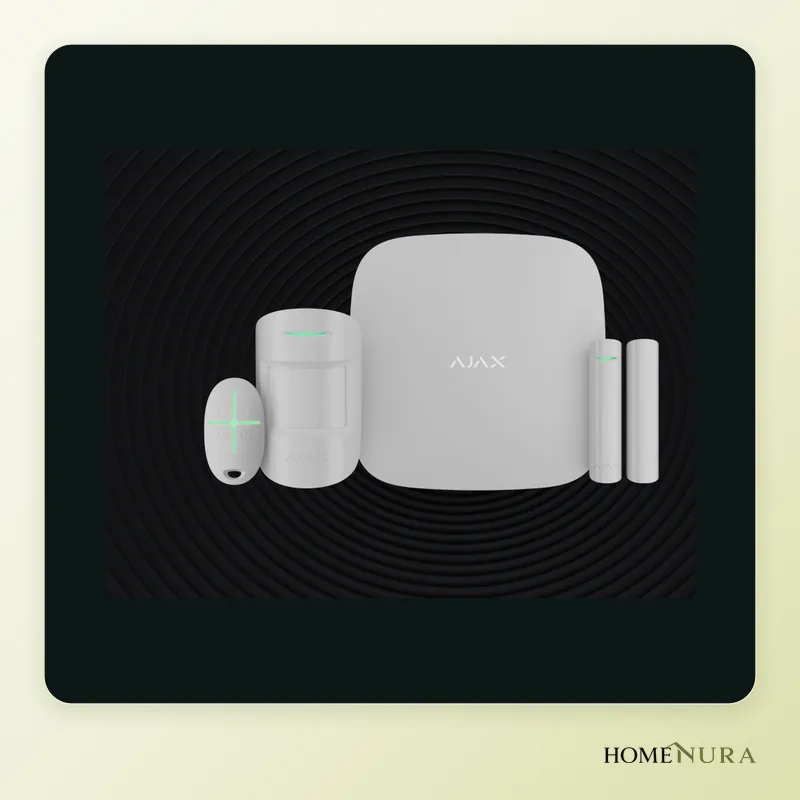
Ajax StarterKit 4G
A hub with Ethernet and 4G, motion and door/window sensors and no mandatory subscription: the most reliable foundation for a complete system.
Photo: © Ajax Systems
- View on Amazon →
Best value
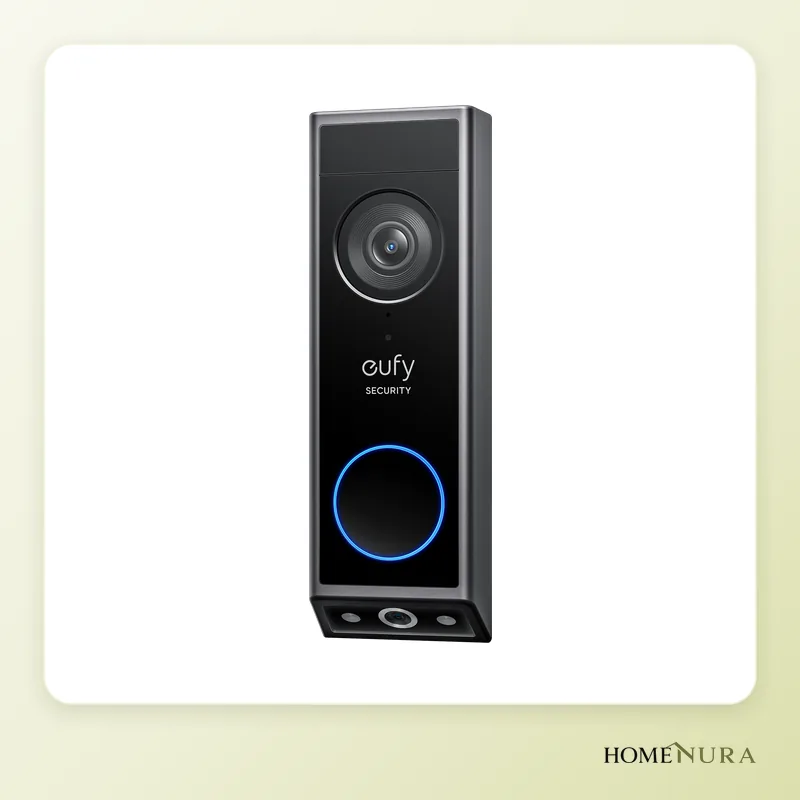
Eufy Video Doorbell E340
Dual camera for visitors and packages, 8 GB of built-in storage and no subscription needed for video history.
Photo: © eufy Security (Anker)
- View on Amazon →
Best smart lock
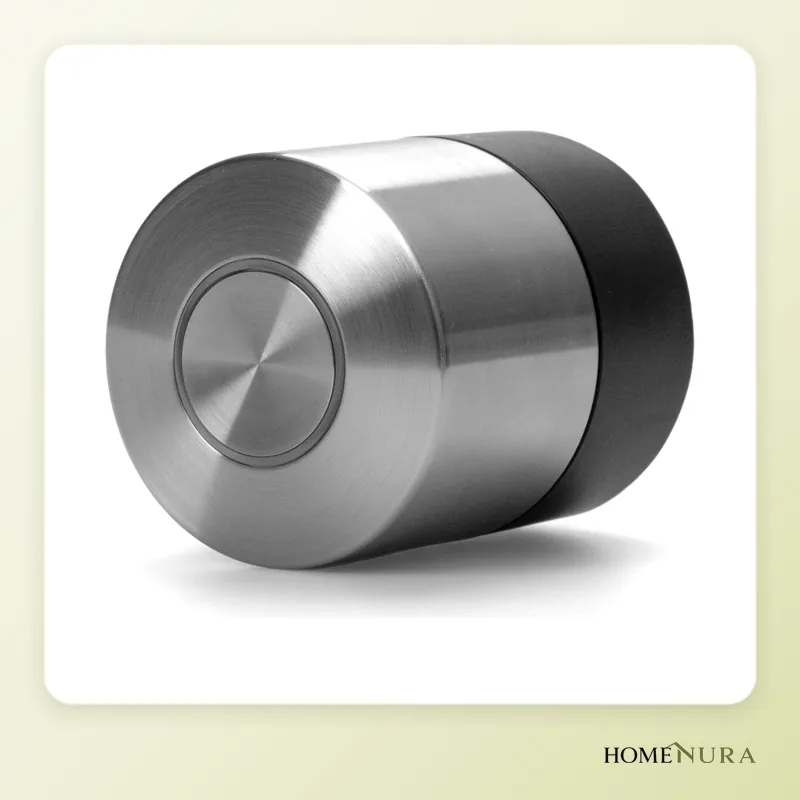
Nuki Smart Lock Pro (5th generation)
Fits over an existing euro cylinder lock, with built-in Wi-Fi, Matter over Thread and a rechargeable battery, for keyless shared access.
Photo: © Nuki


As an Amazon Associate I earn from qualifying purchases. Amazon affiliate links: commission at no extra cost to you.
To secure a smart home in 2026, the strongest foundation is a wireless alarm with cellular backup, such as the Ajax StarterKit 4G, paired with a video doorbell that stores footage locally (Eufy Video Doorbell E340) and a smart lock (Nuki Smart Lock Pro, 5th generation). Add cameras that record at home rather than in the cloud, plus smart smoke alarms, and you have a complete system with no mandatory subscription.
This guide is based on manufacturer specifications, independent reviews and verified buyer reviews. It only includes models sold in Europe in 2026; models and versions sold in Canada can differ from the European ones, so check that the listing is for a 120 V North American model. You’ll find all our picks in the home security section.
The five layers of a smart security system
A good system never relies on a single device. Each piece of equipment covers a different risk, and it is the combination that actually protects your home.
- The alarm detects an intrusion (a door opening, movement in a room) and triggers a siren and alerts. It is the most important layer, because it reacts even when nobody is looking at their phone.
- The video doorbell shows who is at the door, lets you answer remotely and keeps a record of visitors and deliveries.
- The smart lock ends the problem of lost or copied keys, lets you unlock the door for someone remotely and keeps an access history.
- Outdoor cameras deter intruders and provide usable footage; indoor cameras let you check what is happening when the alarm goes off.
- Smoke and CO alarms protect against the most serious risks to the people inside: fire and carbon monoxide poisoning.
Models mentioned in this guide


Photos: © Ajax Systems, © eufy Security (Anker), © Nuki, © eufy, © eufy (Anker Innovations)
As an Amazon Associate I earn from qualifying purchases. Amazon affiliate links: we earn a commission at no extra cost to you.
How to choose
Subscription and video storage
For many households, this is the first question. Some brands make a subscription almost essential to view your video history; others store recordings on a microSD card, built-in memory or a local base station. The models selected here work with no monthly fees, although some manufacturers still offer a paid plan for professional monitoring or cloud backup.
Resilience: internet and power outages
An experienced burglar may cut the power or the internet line. A serious alarm therefore needs a backup battery and, ideally, a second communication channel (a 4G SIM card alongside Ethernet or Wi-Fi). Wireless sensors should use a robust radio protocol rather than your home Wi-Fi.
Ecosystem and compatibility
Juggling five different apps quickly gets tiresome. Check compatibility with what you already use: Apple Home, Google Home, Alexa or Matter. Recent locks that support Matter over Thread fit easily into most platforms.
Smart detection
On cameras and doorbells, recognizing people, vehicles or packages sharply reduces false alerts caused by leaves, cats or headlights. For alarm motion detectors, look for pet immunity if you have a dog or cat.
Power and installation
Battery, solar panel, hardwired power or PoE: the choice depends on the location and your DIY skills. A battery-powered device installs in minutes; a wired one never needs recharging but requires running a cable.
The equipment worth choosing in 2026
1. Ajax StarterKit 4G — the best alarm foundation
The kit includes a Hub 2 (4G) control panel, a MotionProtect motion detector, a DoorProtect door and window sensor and a SpaceControl key fob with a panic button. The hub communicates over Ethernet and 4G, and alerts you by push notification, text message and phone call. The sensors use Ajax’s proprietary radio protocol, known for its range and reliability.
Strengths: two communication channels; pet-immune motion detector; an app with no mandatory subscription; a very wide range of sensors (glass break, flood, detectors with photo verification); professional monitoring available through approved partners.
Limitations: no siren in the kit; no native Apple Home or Google Home integration; premium hardware.
Best for: houses and apartments that want a professional-grade alarm the owner can install. If you prefer another ecosystem, the Somfy Home Alarm Advanced and the Ring Alarm Pack M (Gen 2) are compared in our guide to home alarms without subscription.
2. Eufy Video Doorbell E340 — the subscription-free doorbell
The E340 combines two cameras: a 2K front camera for visitors and a second one pointing down to watch packages left at the door. Video is saved to 8 GB of built-in storage with no monthly fees, and can also be stored on a HomeBase S380.
Strengths: no subscription needed for video history; colour night vision; person and package detection; runs on battery or on existing doorbell wiring.
Limitations: on battery, runtime drops noticeably at a very busy entrance; the eufy app is feature-rich but dense for beginners.
Best for: homes with a street-facing door or gate, and anyone who gets a lot of deliveries.
3. Nuki Smart Lock Pro (5th generation) — the benchmark smart lock
It mounts on the inside of the door, over the existing euro cylinder, without replacing the lock. It has built-in Wi-Fi, Bluetooth and Matter over Thread, so no bridge is needed for remote access. The battery is rechargeable, and its brushless motor locks quickly.
Strengths: works with Apple Home, Google Home, Alexa and Home Assistant via Matter; temporary or recurring access for family, a cleaner or guests; full access history.
Limitations: the cylinder needs an emergency function (it can be opened from outside with a key even when a key is left in the lock on the inside); the keypad is sold separately; the housing is fairly bulky. On a tighter budget, the Nuki Smart Lock Go keeps the essentials, and the Aqara U200 comes with its keypad.
Best for: homes with a euro-profile cylinder lock; most Canadian exterior doors use a deadbolt instead, so check your door first. Compare models in our smart lock guide.
4. eufyCam S3 Pro — the self-sufficient outdoor camera
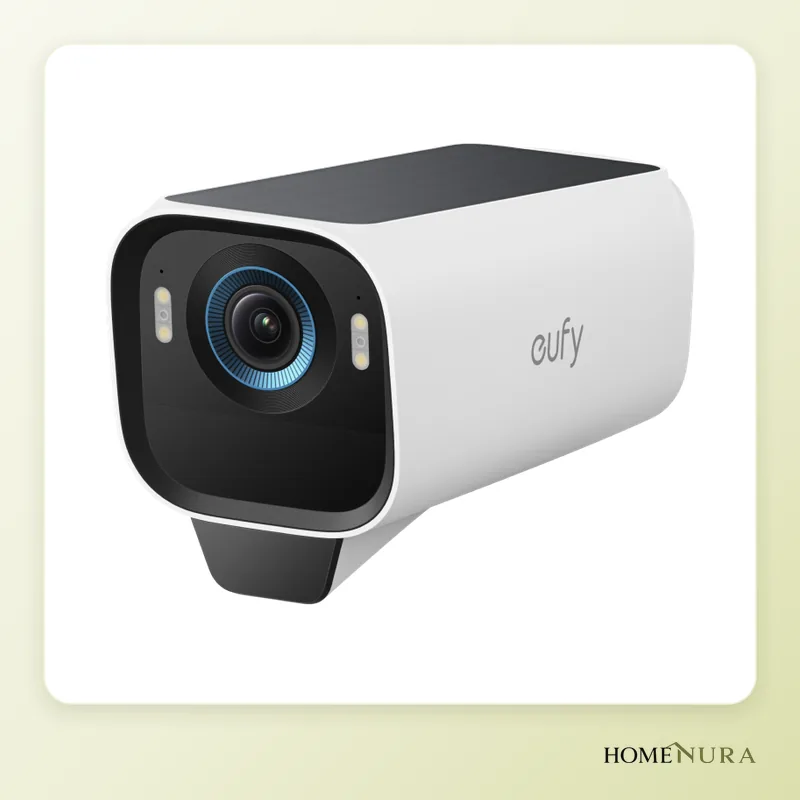
This camera records in 4K with a large sensor and colour night vision (MaxColor Vision). It has a built-in solar panel, radar motion detection and an IP67 rating. It works only with the HomeBase S380, which stores footage locally and can take a hard drive.
Strengths: very good night images, according to independent reviews; little or no recharging thanks to solar; local storage with no subscription; built-in siren.
Limitations: the HomeBase is mandatory; solar performance depends on how much sun the wall gets.
Best for: houses with a yard that want to avoid running cables. For a wired PoE setup or a tighter budget, see our outdoor camera comparison.
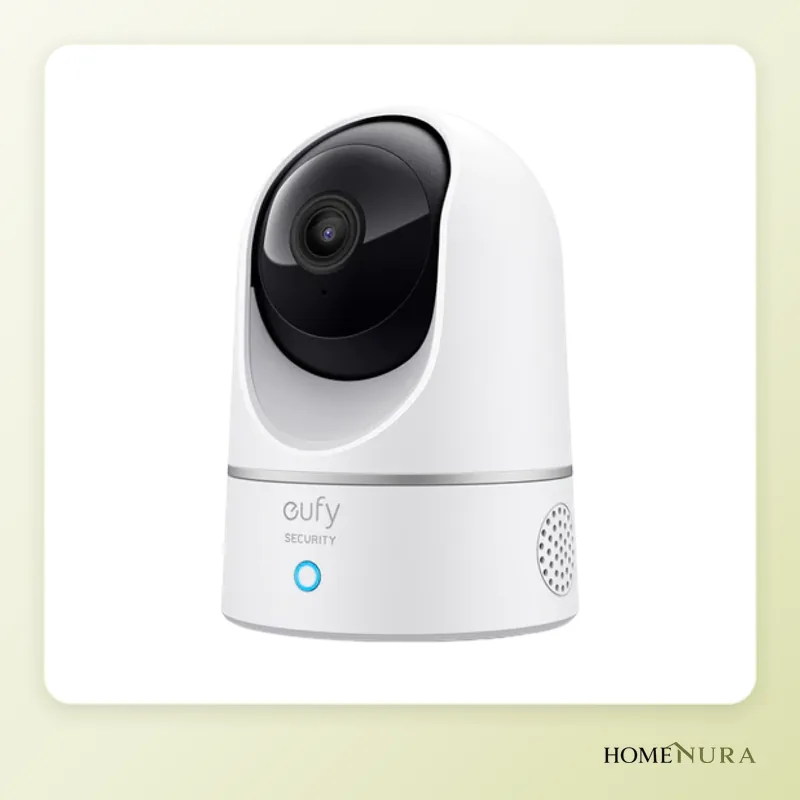
5. Eufy Indoor Cam E220 — the versatile indoor camera
This motorized 2K camera pans 360° and tilts 96°, with automatic motion tracking. It records to a microSD card of up to 128 GB and can tell people from pets. It is compatible with Apple Home.
Strengths: one camera covers a whole room; local storage; two-way audio to talk to a child or reassure a pet.
Limitations: keep it to living areas, never bedrooms or bathrooms, and set it to switch off automatically when you are home. The Reolink E1 Pro is a close alternative.
Best for: checking what triggered an alert, or keeping an eye on a pet or an entrance.
6. Netatmo Smart Smoke Alarm — the smart smoke alarm
Certified to the European EN 14604 standard, it sounds at 85 dB and alerts your smartphone when it detects smoke, even when you are away. Its built-in battery lasts 10 years, and it connects over Wi-Fi with no hub.
Strengths: wireless installation in minutes; the siren works even without internet; compatible with Apple Home and Google Home.
Limitations: the alarms are not interconnected with each other; no carbon monoxide detection. Smoke alarm requirements vary, so check the rules in your province or territory and look for a ULC or CSA mark on any alarm you install in a Canadian home. More options in our smart smoke detector comparison.
Comparison table
| Device | Role | Key spec | Connectivity | Storage / subscription | Best for |
|---|---|---|---|---|---|
| Ajax StarterKit 4G | Alarm | 4G hub + motion and door/window sensors | Ethernet, 4G, Ajax radio | No mandatory subscription | Foundation of any system |
| Eufy Video Doorbell E340 | Video doorbell | Dual camera (visitors + packages) | Wi-Fi | 8 GB built in, no subscription | Front door and deliveries |
| Nuki Smart Lock Pro (5th generation) | Access | Fits existing euro cylinder | Wi-Fi, Bluetooth, Matter over Thread | No subscription | Keyless shared access |
| eufyCam S3 Pro | Outdoor camera | 4K, solar, radar | Via HomeBase S380 | Local on HomeBase | Yard and exterior |
| Eufy Indoor Cam E220 | Indoor camera | 2K, 360° pan | Wi-Fi | microSD up to 128 GB | Alarm verification |
| Netatmo Smart Smoke Alarm | Fire | EN 14604, 10-year battery | Wi-Fi | No subscription | Remote alerts |
Building a system for your home
Apartment or condo
A smart lock, an indoor camera facing the entrance and a smoke alarm cover the essentials. A door sensor on the front door, linked to a small alarm, adds real protection. Check your building’s or condo board’s rules before installing a video doorbell in a shared hallway.
House
Start with the alarm: a door sensor on every exterior door and a motion detector in the areas an intruder has to cross (hallway, stairs). Then add the video doorbell, one or two outdoor cameras covering the entrances and a smoke alarm on every floor.
Cottage
Prioritize resilience: an alarm with a 4G SIM and a backup battery, plus water leak sensors if the water stays on. A smart lock makes it easy to let in a contractor or a neighbour while you are away.
Installation and good practice
- Cameras: mount them at around 2.5 m (about 8 ft), out of reach, aimed at entry points and away from direct sun.
- Network: change default passwords, turn on two-factor authentication in each app and install firmware updates.
- Lock: always keep a mechanical spare key somewhere safe, and check the battery level in the app.
- Alarm: trigger a test alert after installation and make sure the siren can be heard throughout the house.
- Electrical work: any work on the electrical panel or a new circuit should be done by a licensed electrician; the rules are set by each province and territory.
Privacy: the rules to respect
You can film inside your home and on your own property. However, your cameras shouldn’t cover the public street or your neighbours’ property: use the privacy zones most apps offer to mask the sidewalk or the house across the street. If you employ someone in your home (a nanny or a cleaner), tell them that cameras are in use. Privacy rules differ from one country and province to another, so check the guidance that applies where you live. Local storage also limits how much of your footage ends up on third-party servers.
Mistakes to avoid
- Relying only on cameras: a camera records, but only an alarm drives an intruder away during a break-in.
- Mixing brands without checking compatibility: you’ll end up with five apps and no automation.
- Ignoring internet outages: without a battery or 4G, a Wi-Fi alarm goes silent at the worst moment.
- Forgetting carbon monoxide if you have a gas furnace, boiler, water heater, wood stove or fireplace: you need a dedicated CO alarm.
- Keeping factory settings: default passwords and oversized detection zones create security gaps and false alerts.
Our verdict
For most households, the most effective buying order is: the Ajax StarterKit 4G as the alarm foundation, then the Eufy Video Doorbell E340 for the front door and the Nuki Smart Lock Pro (5th generation) to manage access. Round it out with the eufyCam S3 Pro outside, the Eufy Indoor Cam E220 inside and a Netatmo Smart Smoke Alarm on each floor. The result is a coherent system with no mandatory subscription that you can expand room by room.
Frequently Asked Questions
Do I need a subscription for a smart home security system?
Which device should I start with?
Does a smart alarm work without internet?
Is a smart lock as secure as a traditional lock?
Am I allowed to film outside my home?
Can a smart smoke alarm replace a standard one?
Article from our comprehensive guide
Home Security →Our recommendations
Photos: © Ajax Systems, © eufy Security (Anker), © Nuki, © eufy, © eufy (Anker Innovations)
As an Amazon Associate I earn from qualifying purchases. Amazon affiliate links: we earn a commission at no extra cost to you.


